
I don't understand why independent angle in Bone Constrain is not animatable.
Moderators: Víctor Paredes, Belgarath, slowtiger

I don't understand why independent angle in Bone Constrain is not animatable.
I have requested a new feature for the animation keyframe or animation for independent angle for long time; As I remember, maybe before the a few last updated version. I think Independent Angle should be animated, and I hope the developer team is working on it for the next updates too.
Sreng Pagna, animator and author

Re: I don't understand why independent angle in Bone Constrain is not animatable.
Hi,
I'm not sure what you mean. I animate Independent Angle all the time, typically for foot setups. For example...

In the above, I'm using Independent Angle to keep the foot bone level with the ground, but I'm also keyframing the rotation of the bone after the foot is lifted off the ground.
What Independent Angle does is it puts a bone's rotation into world space, so it effectively bypasses the rotation of parent bones. It should not prevent you from keyframing the bone.
Are you not seeing this behavior?

I'm not sure what you mean. I animate Independent Angle all the time, typically for foot setups. For example...
In the above, I'm using Independent Angle to keep the foot bone level with the ground, but I'm also keyframing the rotation of the bone after the foot is lifted off the ground.
What Independent Angle does is it puts a bone's rotation into world space, so it effectively bypasses the rotation of parent bones. It should not prevent you from keyframing the bone.
Are you not seeing this behavior?
Animations, Tutorials, and Cats (Oh, My!) Little Green Dog Channel on YouTube!
D.R. Greenlaw
Artist/Partner - Little Green Dog
Little Green Dog Channel | My DreamWorks Animation Reels & Others
D.R. Greenlaw
Artist/Partner - Little Green Dog
Little Green Dog Channel | My DreamWorks Animation Reels & Others
Re: I don't understand why independent angle in Bone Constrain is not animatable.
Oh, wait! I know what meant: Independent Angle's on/off state should be keyframeable. Yes, I agree with you! I've asked for this option myself. Sorry, it was early in the morning and I had not had my coffee yet. 
You can sort of work around this limitation using Vitruvian Bones, but having a keyframeable On/Off option would be easier and very useful, especially when used in a Smart Bone.
You can sort of work around this limitation using Vitruvian Bones, but having a keyframeable On/Off option would be easier and very useful, especially when used in a Smart Bone.
Animations, Tutorials, and Cats (Oh, My!) Little Green Dog Channel on YouTube!
D.R. Greenlaw
Artist/Partner - Little Green Dog
Little Green Dog Channel | My DreamWorks Animation Reels & Others
D.R. Greenlaw
Artist/Partner - Little Green Dog
Little Green Dog Channel | My DreamWorks Animation Reels & Others
Re: I don't understand why independent angle in Bone Constrain is not animatable.
Yes, that's what I mean.Greenlaw wrote: ↑Fri May 30, 2025 10:39 am Oh, wait! I know what meant: Independent Angle's on/off state should be keyframeable. Yes, I agree with you! I've asked for this option myself. Sorry, it was early in the morning and I had not had my coffee yet.
You can sort of work around this limitation using Vitruvian Bones, but having a keyframeable On/Off option would be easier and very useful, especially when used in a Smart Bone.
Sreng Pagna, animator and author
Re: I don't understand why independent angle in Bone Constrain is not animatable.
Yeah, keyframeable Independent Angle something I can really use, but got used to not having it, and almost forgot about it.
The other feature I still want is keyframeable visibility for bones. I use Vitruvian Bones as a workaround for this, too, but it would be simpler if I could keyframe a bone's visibility directly.
Hopefully, we'll see these features someday! They would be super helpful!
The other feature I still want is keyframeable visibility for bones. I use Vitruvian Bones as a workaround for this, too, but it would be simpler if I could keyframe a bone's visibility directly.
Hopefully, we'll see these features someday! They would be super helpful!
Animations, Tutorials, and Cats (Oh, My!) Little Green Dog Channel on YouTube!
D.R. Greenlaw
Artist/Partner - Little Green Dog
Little Green Dog Channel | My DreamWorks Animation Reels & Others
D.R. Greenlaw
Artist/Partner - Little Green Dog
Little Green Dog Channel | My DreamWorks Animation Reels & Others
Re: I don't understand why independent angle in Bone Constrain is not animatable.
Sreng Pagna, animator and author

Re: I don't understand why independent angle in Bone Constrain is not animatable.
Yes! But not just on and off. It would be nice to have a percentage to smoothly transition it from 100% influence and 0%.
Similarly, I would like to be able to animate which bones are control bones. That way I can have an arm with bones that reference two other sets of bones, an IK set and an FK set. And then I can transition between which set is driving the actual arm bones.
And the ability to create bone groups so you can hide and show them by group (not just vitruvian or a single shy 'group') would be super helpful to keep everything clean.
Similarly, I would like to be able to animate which bones are control bones. That way I can have an arm with bones that reference two other sets of bones, an IK set and an FK set. And then I can transition between which set is driving the actual arm bones.
And the ability to create bone groups so you can hide and show them by group (not just vitruvian or a single shy 'group') would be super helpful to keep everything clean.
-
martin_mrt

- Posts: 72
- Joined: Mon Mar 25, 2024 7:09 am
Re: I don't understand why independent angle in Bone Constrain is not animatable.
I came here to post that exact request: Please make the independent angle option keyable.
That would be really really awesome!
Just found out recently that targets are keyable. which actually blew my mind. thats awesome. would be even awesomer with independent angle keyable.
pls. <3
XD
That would be really really awesome!
Just found out recently that targets are keyable. which actually blew my mind. thats awesome. would be even awesomer with independent angle keyable.
pls. <3
XD
-
martin_mrt
- Posts: 72
- Joined: Mon Mar 25, 2024 7:09 am
Re: I don't understand why independent angle in Bone Constrain is not animatable.
On our project we use the Toggle Color Bones Script for that. Works very niceley. eg. all face bones are one color and toggled on or off when needed.
-
synthsin75

- Posts: 10576
- Joined: Mon Jan 14, 2008 2:20 pm
- Location: Oklahoma
- Contact:
Re: I don't understand why independent angle in Bone Constrain is not animatable.
Luckily, you can cheat animated independent angle... with an animated target:martin_mrt wrote: ↑Wed Sep 30, 2026 10:33 am I came here to post that exact request: Please make the independent angle option keyable.
That would be really really awesome!
Just found out recently that targets are keyable. which actually blew my mind. thats awesome. would be even awesomer with independent angle keyable.
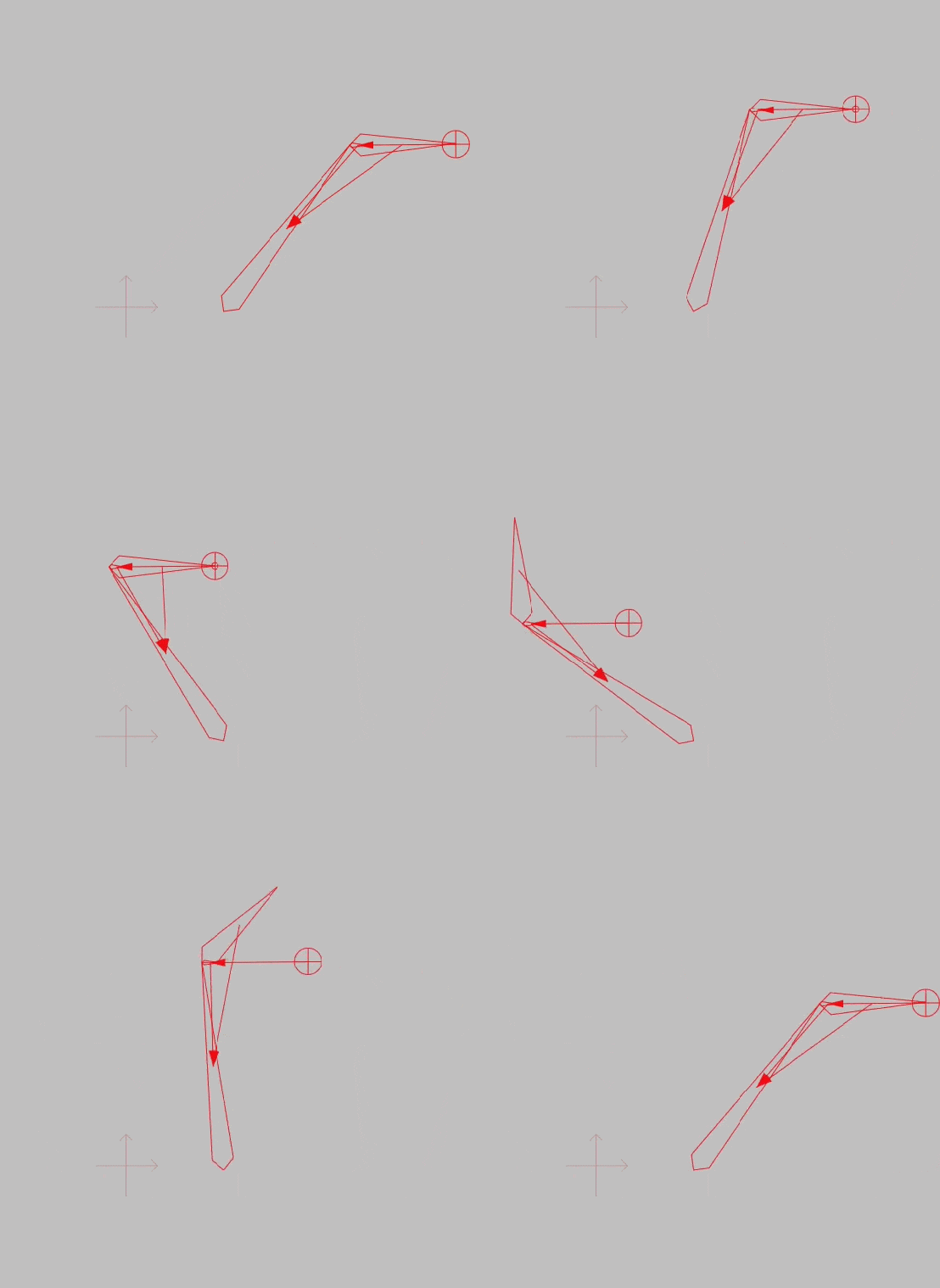
Just create a small bone with the same parent and set it to independent angle and make that bone the parent of a target. Now when your bone targets this target, it acts like independent angle, and when it doesn't, it acts normally.
Hope that helps.
- Wes
Donations: https://www.paypal.com/paypalme/synthsin75 (Thx, everyone.)
https://www.youtube.com/user/synthsin75
Scripting reference: https://mohoscripting.com/
Donations: https://www.paypal.com/paypalme/synthsin75 (Thx, everyone.)
https://www.youtube.com/user/synthsin75
Scripting reference: https://mohoscripting.com/