Moho 14.5 Update feedback

General Moho topics.

Moderators: Víctor Paredes, Belgarath, slowtiger

Post Reply
User avatar
J. Baker
Posts: 1173
Joined: Wed Mar 23, 2005 10:22 am
Location: USA
Contact:

Moho 14.5 Update feedback

Post by J. Baker »

Just downloaded the 14.5 update and immediately tried the updated freehand and bucket tools. I see improvement in the bucket tool, specially using "Trace" but still not 100% liking it. The freehand tool still is not up to par.

The input is too sensitive for line drawing.
1.) I still get the stupid little curl(s) at the beginning and end of strokes more often then I should.
2.) Lines are too thin unless I drastically increase the percentage.
3.) Lines have too much falloff (reduced pressure) even if you increase the line percentage.
4.) Stroke transparency is too sensitive.

I understand that Moho is going for accuracy when coding the freehand tool but you can not do that. Reduce/crunch the wide range of the input and you will get better results. And check the beginning and ends of the line(s) to reduce the curl effect, which may be fixed if the sensitivity wasn't so sensitive to begin with. In the real world, pen in hand to paper, I don't get these issues. Tablets offer a wide digital range in their values and are too sensitive. Just crunch the sensitivity like when you crunch the colors of a GIF file. 24bit color is nice but I only need 256 colors to produce an optimized animation.

Moho is the better animation tool by far but Toon Boom (Studio and Harmony) have better drawing results because the tablet/freehand tool is not so sensitive, value-wise.

And bring back the Flash export! :lol: Laughing but seriously.

EDIT:
A wide range of sensitivity is good for painting like in Artrage or coloring with brushes in Moho but for vector style (line art) animation it's too much. Maybe a slider control for tablet input sensitivity would solve the issue. But then again, Toon boom, ArtRage and Callipeg all have wide ranges of sensitivity and I don't have these issues like in Moho. Maybe it is something else going on. Their code must be doing something different.
Last edited by J. Baker on Tue Oct 13, 2026 7:02 am, edited 1 time in total.
User avatar
J. Baker
Posts: 1173
Joined: Wed Mar 23, 2005 10:22 am
Location: USA
Contact:

Re: Moho 14.5 Update feedback

Post by J. Baker »

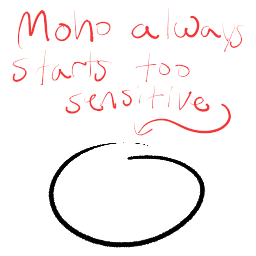
Moho starts drawing too sensitive. You can see it even in the text I'm writing.

Image
User avatar
slowtiger
Posts: 6402
Joined: Thu Feb 16, 2006 9:53 am
Location: Berlin, Germany
Contact:

Re: Moho 14.5 Update feedback

Post by slowtiger »

I think this is much more an issue of individual settings, namely the pressure sensitivity settings of the tablet itself. I remember it took me quite some time to get that right, I ended in a setting where I barely had to apply pressure to get a normal line, which I'm very happy with (and my hand muscles!). So the sequence should be: first check tablet settings, then go into program settings.
AS 9.5 MacPro Quadcore 3GHz 16GB OS 10.6.8 Quicktime 7.6.6
AS 11 MacPro 12core 3GHz 32GB OS 10.11 Quicktime 10.7.3
Moho 13.5 iMac Quadcore 2,9GHz 16GB OS 10.15
Moho 14.5 Mac Mini M2 Pro OS 13.7.8
User avatar
J. Baker
Posts: 1173
Joined: Wed Mar 23, 2005 10:22 am
Location: USA
Contact:

Re: Moho 14.5 Update feedback

Post by J. Baker »

slowtiger wrote: ↑Tue Oct 13, 2026 7:30 am So the sequence should be: first check tablet settings, then go into program settings.
For sure but I have already done that. Like I said though, three other apps don't have this issue. Just Moho. And if I use Moho for freehand drawing, I use "Freehand Pro" tool because it woks better. So something is going on internally in Moho, I guess. I wish it would get resolved because it is the best animation app. Just has a bad freehand tool. People complain about this all the time on Reddit. It sucks because then they just move on and miss out on a great animation tool.
User avatar
Gaucho
Posts: 154
Joined: Tue Nov 17, 2015 1:55 pm
Contact:

Re: Moho 14.5 Update feedback

Post by Gaucho »

Thanks Lost Marble Team for the recent Moho Pro 14.5 update.
I am still exploring its added features but after opening the new onion skins, I couldn't wait to come to the Forum and once again say thank you!
Good job!!!
User avatar
slowtiger
Posts: 6402
Joined: Thu Feb 16, 2006 9:53 am
Location: Berlin, Germany
Contact:

Re: Moho 14.5 Update feedback

Post by slowtiger »

OK, installed 14.5 and did a quick test. Freehand tool works on my end as expected: not too thin beginning, smooth, range as set in the panel. Wacom Cintiq on Mac mini.
AS 9.5 MacPro Quadcore 3GHz 16GB OS 10.6.8 Quicktime 7.6.6
AS 11 MacPro 12core 3GHz 32GB OS 10.11 Quicktime 10.7.3
Moho 13.5 iMac Quadcore 2,9GHz 16GB OS 10.15
Moho 14.5 Mac Mini M2 Pro OS 13.7.8
User avatar
J. Baker
Posts: 1173
Joined: Wed Mar 23, 2005 10:22 am
Location: USA
Contact:

Re: Moho 14.5 Update feedback

Post by J. Baker »

slowtiger wrote: ↑Tue Oct 13, 2026 9:58 am OK, installed 14.5 and did a quick test. Freehand tool works on my end as expected: not too thin beginning, smooth, range as set in the panel. Wacom Cintiq on Mac mini.
OS X code behavior could very well be much different. Thanks for testing though.
User avatar
Unprofessional
Posts: 1
Joined: Fri Jan 30, 2026 5:41 am
Contact:

Re: Moho 14.5 Update feedback

Post by Unprofessional »

Whoever had the idea of combining smart bones with live controllers was a genius. The possibilities it opens are endless. Entirely new workflow. I've been waiting for something like that for years, but the way it has been implemented in Moho is super smart.

Lack of puppeteering in Moho (together with incredibly poor performance of motion tracking) was the reason I had to switch to Reallusion's Cartoon Animator. Sad. Bad. Painful. And now I hear they fixed both those problems! Not only that, but Moho's implementation is way more advanced, consistent and user friendly. I haven't been so excited by a software update since Windows 95! I can finally switch back to Moho!

I believe with this patch Moho has become incredibly powerful tool for those of us, who are not exactly pro but not kids either. So far it was the area of Cartoon Animator, but since today Moho rules supreme. All hail Moho!

I only wish there was some middle ground between Debut and Pro versions. Debut sure is cheap first step, but if the next one means paying 666% more, it's not easy to make that step.
User avatar
J. Baker
Posts: 1173
Joined: Wed Mar 23, 2005 10:22 am
Location: USA
Contact:

Re: Moho 14.5 Update feedback

Post by J. Baker »

And just to add...

My my other PC, Surface Pro 7 (Windows 11), pen pressure/sensitivity doesn't work at all in Moho. Yet it does in the other apps I already mentioned. That's two different PC's with two different pens/tablets, although I'm drawing directly on screen on the Surface Pro 7. So the issue is with Moho somewhere. At least on Windows version.
User avatar
SimplSam
Posts: 1365
Joined: Thu Mar 13, 2014 9:09 am
Location: London, UK
Contact:

Re: Moho 14.5 Update feedback

Post by SimplSam »

J. Baker wrote: ↑Tue Oct 13, 2026 12:27 pm ...My my other PC, Surface Pro 7 (Windows 11), pen pressure/sensitivity doesn't work at all in Moho...
Have you tried Edit > Preferences > Tools > Prefer WinTab...? as that switches between WinTab and Windows Ink.
Moho 14.5 » Win 11 Pro 64GB » NVIDIA GTX 1080ti 11GB
Moho 14.5 » Mac mini 2012 8GB » macOS 10.15 Catalina
Tube: SimplSam


Sam
User avatar
J. Baker
Posts: 1173
Joined: Wed Mar 23, 2005 10:22 am
Location: USA
Contact:

Re: Moho 14.5 Update feedback

Post by J. Baker »

SimplSam wrote: ↑Tue Oct 13, 2026 12:50 pm
J. Baker wrote: ↑Tue Oct 13, 2026 12:27 pm ...My my other PC, Surface Pro 7 (Windows 11), pen pressure/sensitivity doesn't work at all in Moho...
Have you tried Edit > Preferences > Tools > Prefer WinTab...? as that switches between WinTab and Windows Ink.
It actually works with it unchecked. I don't think I ever knew that option was available in Moho. Thanks!

I will have to try it on my main PC and see if there is any difference.

EDIT:
No difference on my main PC. It was worth a try though.
Post Reply