Page 1 of 1
Can the Transform Points bounding box be aligned to the deformed object?
Posted: Mon Dec 01, 2025 11:34 pm
by tifacloud7
Hi everyone,
Is there a way to make the bounding box of the Transform Points tool align with the object being deformed, instead of always staying aligned to the screen?
When I’m working with mesh, I often need the bounding box to match the mesh orientation, not the screen orientation. I searched all morning but couldn’t find anything in the tutorials or documentation. It seems like this feature exists in Illustrator, but I’m not sure if Moho has something similar.
My current workaround is to keep the object and the mesh level horizontally, and only use bones with keyframes when I need rotation. But this becomes very difficult to manage during binding, so I’m hoping there might be a way to reset or re-align the bounding box directly.
If anyone knows a method or hidden option for this, I’d really appreciate it. Thanks!
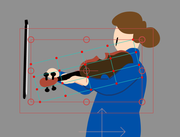
from this
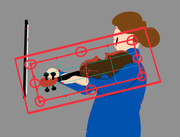
to this
P.S.: Sorry, English is not my first language. I used ChatGPT to help with the translation, so please forgive me if anything sounds unclear or unnatural.
Re: Can the Transform Points bounding box be aligned to the deformed object?
Posted: Tue Dec 02, 2025 1:37 am
by Maestral
Hi, your message is quite understandable, just as your query.
I believe the option from Illustrator that you're referring to is Reset Bounding Box. There are some differences in behaviour, and thus, I think there are some reasons for the current state.
First of all, in Moho and as is, you can animate points and layer transformations separately. On the same keyframe, you can transform the layer and its points. I believe that could be a proper reason to keep it. In Illustrator, the Reset Bounding Box option confirms that the object's transformation is final and, for convenience, resetting the box alignment is preferred.
So, basically, two different intentions behind almost the same operation.
On a side note...
Do you know that Origin in point transformation can be animated? If you set the layer's position correctly, having the Origin for points adjusted could help you overcome the inconvenience. Layer's transformation would relate to bones where the inner, points' origin, would help you manipulate them. I think

Re: Can the Transform Points bounding box be aligned to the deformed object?
Posted: Tue Dec 02, 2025 9:03 am
by synthsin75
If you draw the mesh straight and rotate the layer instead, the point transform bounding box will stay aligned with the points.
Re: Can the Transform Points bounding box be aligned to the deformed object?
Posted: Tue Dec 02, 2025 11:30 am
by Greenlaw
Normally, I would add a bone, align it with the artwork, and then rotate the bone for animation. The orientation of the bounding box isn't important, and it isn't even visible when animating in the bone layer.
But if you must animate the layer instead, you should align the artwork (points) horizontally at frame 0, and then rotate the layer at frame 1.
Alternatively, you can create an empty group, align the group layer to the artwork, and then drag the artwork layer into the aligned group layer. When you animate the arm, animate the aligned group layer instead of the art layer. (IMO, if you want to animate a layer, this is probably the best option. But I still think it makes more sense to animate a bone.)
Hope this helps.
Re: Can the Transform Points bounding box be aligned to the deformed object?
Posted: Tue Dec 02, 2025 11:48 am
by Greenlaw
Greenlaw wrote: ↑Tue Dec 02, 2025 11:30 am
Alternatively, you can create an empty group...
Ack! Sorry, this doesn't work the way I imagined. (I must have been thinking of After Effects.) I'm actually in Moho now, so let me get back to you on this.
Re: Can the Transform Points bounding box be aligned to the deformed object?
Posted: Tue Dec 02, 2025 12:05 pm
by Greenlaw
Ok, I got it...give me a second to post a couple of GIFs.
Re: Can the Transform Points bounding box be aligned to the deformed object?
Posted: Tue Dec 02, 2025 12:35 pm
by Greenlaw
Ok, here we go.
1. Bones - This would be the 'normal' way to deal with this in Moho...

Just use Bind Layer to a bone and be done.
2. Group Layer - This is the third suggestion, but with additional info...

What I'm doing...
1. Duplicate the layer and set the transparency to around 20%. This will be your positional reference.
2. Put the original Artwork layer inside a Group.
3. Move the Origin of the Artwork layer to the end of the art and rotate the layer to align horizontally.
4. Close the Group layer, then select it.
5. Move the Origin of the Group layer to the same position, and rotate it to align with the reference image.
6. Delete the reference.
Now, instead of animating the Artwork layer, just select and animate the Group layer.
Re: Can the Transform Points bounding box be aligned to the deformed object?
Posted: Tue Dec 02, 2025 12:55 pm
by Greenlaw
One more coming up...this one will be easier.

Re: Can the Transform Points bounding box be aligned to the deformed object?
Posted: Tue Dec 02, 2025 1:12 pm
by Greenlaw

This technique is the same idea but applied to the original artwork layer, so it's closer to your request.
1. Duplicate the layer and set the opacity to 20%. This is your positional reference.
2. With the original artwork layer selected, use Transform Points to move the tool's pivot point and to align the artwork points horizontally.
3. Switch to Set Origin to move the Layer Origin
4. Switch to Transform Layer and rotate the layer to align with the reference.
Your layer is now aligned with the artwork's angle at frame 0 (no need to adjust frame 1). You can delete the reference.
(Update: I just read Wes' last post, and this is basically what he described, but with the reference image added. I really should read the entire thread before posting.)

Re: Can the Transform Points bounding box be aligned to the deformed object?
Posted: Fri Dec 05, 2025 1:30 am
by tifacloud7
Wow

thank you all so much for the warm and detailed replies! Sorry for the slow response — it’s been a few busy days.
Maestral, thank you for reminding me that different software has different logic. I really did overlook layer transformations; I’ve always treated them as something only for moving the entire character at the end

Wes, your straightforward explanation really woke me up. I didn’t even realize why I was so resistant to adjusting the layer itself

And Greenlaw, thank you for taking the time to record a video! It helped me understand everything so clearly. The idea of adding a group as a workaround is really enlightening — it’s just like using a pre-comp in After Effects. And your last method was so intuitive. The video was a huge help. Really appreciate it!

Thanks again, everyone!
Re: Can the Transform Points bounding box be aligned to the deformed object?
Posted: Fri Dec 05, 2025 8:15 am
by Greenlaw
Glad that helped!
Yes, using a group this way is similar to using a Precomp in Ae, but it's probably closer to how Nulls are used in Ae.
(I wish we had Nulls in Moho, and I also want the camera to appear as a 'layer' so it can be part of the parental chain with Nulls and Groups. This way, we can build a decent camera rig like in other 2D/3D animation programs.)