Page 1 of 1
Complex Fill
Posted: Mon Mar 02, 2026 11:13 pm
by x-vishon
I have a shape I am trying to create a fill for and it is closed correctly, the fill shows the checker pattern in the right area as well when selected but when I click fill no fill is created.
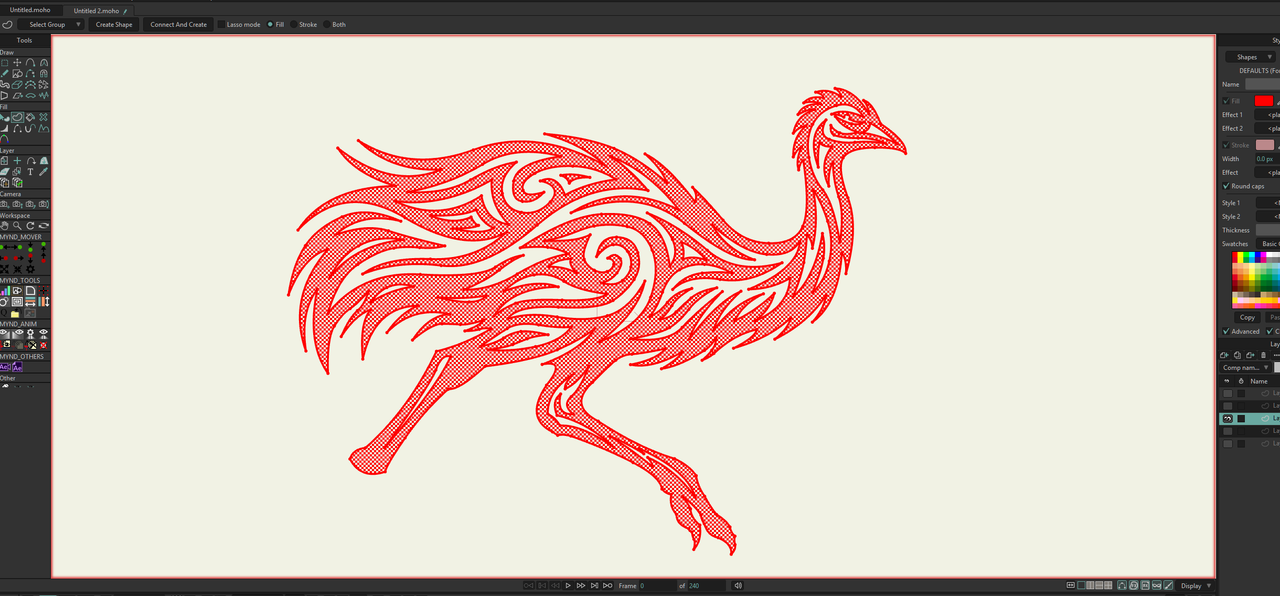
Is there a limitation to the number of holes or something that I am not aware of? No idea why I cant make a fill in this shape.
Re: Complex Fill
Posted: Tue Mar 03, 2026 6:57 am
by Greenlaw
I'm not aware of a limit, but you might consider simplifying the shape structure within the path. This doesn't mean simplifying the drawing, rather it means breaking the complex paths into multiple shapes that still render as a 'single shape'. When a shape gets this complex, you're likely to see render problems as it deforms.
Breaking it this into fewer shapes instead of one giant complex shape can also make it easier to work with. As a result, the drawing will look the same (same number of points and placement) and render correctly.
Cool drawing, btw.

Re: Complex Fill
Posted: Tue Mar 03, 2026 8:40 am
by hayasidist
As Greenlaw has said plus -- I've found this sort of problem where:
- paths (and also points) are too close together so that there isn't actually room to put a "fill" pixel
- a path that is branched has a branch is also branched (although that usually doesn't show that the shape is fillable)
- points have been added in a sequence that "confuses" Moho (often this also shows up as weird curvatures at the impacted point)
But there's no limit as such to the number of holes - and it's also possible to have islands inside holes (as you have) and holes partially overlapping filled areas - and these work as expected.
If you want to upload the file, I'm sure someone will take a deeper look.
Re: Complex Fill
Posted: Tue Mar 03, 2026 9:23 am
by x-vishon
Here is the file. I wanted it to be a solid Fill because I was sending it off to a laser engraver that needs black fills in an stl file. Confused as to why it is not working since I have never run into this issue in moho before. I have done a lot of complex fills over the years which is why I wonder if this is somehow a bug.
https://www.dropbox.com/scl/fi/l5q2xfcw ... jqxtb&dl=0
Re: Complex Fill
Posted: Tue Mar 03, 2026 11:05 am
by SimplSam
So... I cannot Create the whole shape in one go either, but you can get there with a little help from Liquid Shapes.
1. Point Select the outer Curve and create a filled shape (
lets call it outer)
2. Point Select the outer Curve again, then Edit > Select Inverse (
to select all the other Points), and create another filled shape (
lets call it inner)
3. with that new inner Shape still selected, use the Shape Select tool, and then Liquid Shapes: Subtract
...
4. You can optionally consolidate the new Shapes into 1 by shape selecting the composite shape and using the Merge button

Re: Complex Fill
Posted: Tue Mar 03, 2026 11:20 am
by synthsin75
SimplSam wrote: ↑Tue Mar 03, 2026 11:05 am
4. You can optionally consolidate the new Shapes into 1 by shape selecting the composite shape and using the Merge button
Clever solution.
Re: Complex Fill
Posted: Tue Mar 03, 2026 2:18 pm
by hayasidist
FWIW, I can't get the "outer" path plus any of the subsets of the "inner" paths to fill either, despite the on screen indication to the contrary.
Same idea as Sam - masking also works: outer masked over the (filled) inner as subtract from mask.
But, digging into why this didn't work - it's the "inlet" -- the snaking "internal" part of the overall outline - break that into "true" outline plus empty inside works as expected -- the example here shows where I bridged the gap and made in the "inner bit" a separate path -- not production quality but illustrative of the source of the issue.

A straight guess is that Moho simply couldn't handle the level of complexity of the concave nature of the inside as part of an overall convex shape!??
Re: Complex Fill
Posted: Tue Mar 03, 2026 3:48 pm
by Stan
Strangely, if you add more points, it works.
- Use the Select Points tool.
- Press Ctrl+A to select all.
- Click the Split button. More points added.
- Select the Create Shape tool and hit spacebar. The shape is created.
Re: Complex Fill
Posted: Tue Mar 03, 2026 3:56 pm
by synthsin75
Stan wrote: ↑Tue Mar 03, 2026 3:48 pm
Strangely, if you add more points, it works.
- Use the Select Points tool.
- Press Ctrl+A to select all.
- Click the Split button. More points added.
- Select the Create Shape tool and hit spacebar. The shape is created.
Even just splitting the outside curve works.
My guess is that using bezier points so much is throwing off how Moho calculates the "inside" of a shape. Splitting adds enough points to get it closer to non-bezier construction.
Re: Complex Fill
Posted: Tue Mar 03, 2026 10:06 pm
by x-vishon
Thanks, I'll split the path and try that. I had figured out the liquid shapes and done that but I don't know if that will lead to problems for the laser cutter or not so splitting will no doubt be the best option. It was just such a weird bug I figured I would post about it here since Im not on the beta team anymore. Maybe it will be something they can look into. The thing that really threw me is that the fill seems to be detected as valid in preview and then just not fill.
