Page 1 of 1
Disable line scale in edit mode (frame 0)
Posted: Tue Jun 09, 2026 10:24 am
by J. Baker
When I'm drawing characters, sometimes I have to scale a group (such as a head with multiple layers) in order re-portion a character's body part. It would be nice if there was an option to disable the line width from resizing while editing/creating. And disabling "Scale Composition" in a layer doesn't work as I need it because after the scale I need to re-enable it for animation purposes when the character is completed but it just returns to what it was before disabling it.
Hopefully I have just over-looked a feature after all these years? If not, this would be a nice feature to add.
The "Transform Points" tool for shapes works like this but the "Transform Layer" tool for groups does not.
Re: Disable line scale in edit mode (frame 0)
Posted: Tue Jun 09, 2026 11:32 am
by Greenlaw
Hi,
In general, you don't want to scale the artwork layers at frame 0. Keeping them at 100% gives you a common baseline that ensures all the artwork layers (including their line widths) scale correctly in animation frames. Trust me, this advice will save you from headaches and frustration later on.
When you need to transform the vector art at frame 0, you should do this at the artwork level, not the layer level. There are some good tools for transforming art across multiple layers over at mohoscripts.com.
If you need to scale line-widths globally (i.e., for all outlines in a specific character), create a custom style just for this feature. This gives you a bit of flexibility when you're still deciding on this kind of detail.
Hope this helps.
Re: Disable line scale in edit mode (frame 0)
Posted: Tue Jun 09, 2026 1:47 pm
by J. Baker
Thanks for the reply but I don't think you understand my post but maybe you do. I'm only scaling at frame 0 when I need to re-adjust multi-layers in a group. Just to tidy up the portions to the character. Otherwise I have to adjust each layer and vectors in that layer with the "Tranform Points" tool. Umm, maybe if you could hold a "KEY + Transform Layer" in order to behave like the "Transform Points" tool on a multiple level, that would be cool.
I don't think the a "Style" helps me with this situation but thanks.

Re: Disable line scale in edit mode (frame 0)
Posted: Tue Jun 09, 2026 2:23 pm
by J. Baker
I found the script that does this!
 https://mohoscripts.com/script/ss_multi ... orm_points
Just have to make sure that all the layers are selected in order to see the update live as you scale.
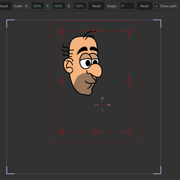
EDIT: Weirdly though, the script doesn't update the transform frame/handle.
Re: Disable line scale in edit mode (frame 0)
Posted: Tue Jun 09, 2026 2:59 pm
by Greenlaw
I
think we’re talking about the same thing: on frame 0, when scaling or otherwise transforming the artwork (points) directly, the line weight doesn’t change. The line weight scales only when you resize the layer or a group.
If you need to affect multiple layers all at once (i.e., the points in multiple layers inside a group), use one of the multi-layer transform points tools.
SimplSam has a very good one here:
Multi-layer Transform Points
A.Evseeva has a handy multilayer magnet tool I use often:
ae-magnet
Hope this helps.
Re: Disable line scale in edit mode (frame 0)
Posted: Tue Jun 09, 2026 3:09 pm
by J. Baker
That's the one I just used. But when you select the "Transform Layer" tool afterwords, the red transform handle box is not properly resized for all the layers. See my image in the post above.
EDIT: Just need to adjust the origin. My bad.
Re: Disable line scale in edit mode (frame 0)
Posted: Wed Jun 10, 2026 6:07 am
by Greenlaw
Oh, yeah...origin, too. (I forgot about that one.) Depending on how you intend to rig and animate, it's important to have that synchronized baseline for all layers at frame 0. Otherwise, expect the unexpected.
Re: Disable line scale in edit mode (frame 0)
Posted: Wed Jun 10, 2026 8:17 pm
by J. Baker
For sure.
Re: Disable line scale in edit mode (frame 0)
Posted: Wed Jul 01, 2026 10:34 am
by J. Baker
I think to go with my original post, my problem is that I always draw big and then scale down to a proper size. I can turn off "Scale compensation" and scale down my character, I just draw with smaller lines (size 4) as I know when I scale down it will be proper; I just wish that maybe you could reset the scale back to 100% without it scaling the character back to 100%. Kind of like, a reset that states this is the actual 100% of what I just scaled down.
I'm kind of picky about all my lines being the same size for all my objects in a scene when they are at 100% scaled. I just draw bigger than what I originally need it because I'm not a fan of drawing small. Can not see what I'm doing sometimes when drawing when it is too small.
Re: Disable line scale in edit mode (frame 0)
Posted: Wed Jul 01, 2026 7:30 pm
by Greenlaw
Some suggestions:
If you want to draw in a larger size 'canvas'...
1. Test and set the Style's Stroke Width to what you want in a vector layer.
2. Group your empty vector layer(s), and scale the Group to 200%.
3. Draw your character using the Style. The lines will be double their thickness.
4. When you're done drawing, scale the Group back down to 100%, and you should have the desired drawing size and line thickness.
Another option you can use with the above or by itself: Create a custom line-only Style and use it throughout your character. This will allow you to globally change the stroke width to whatever you need at any time. ( do this trick for all my characters. It's useful when I need to adjust the drawing for different camera distances (i.e., WIDE, MED, CU, etc.)
Hope this helps.
Re: Disable line scale in edit mode (frame 0)
Posted: Wed Jul 01, 2026 7:36 pm
by Greenlaw
You might think that simply drawing while zoomed in would work, but I suspect the Freehand tool isn't as precise when zoomed in.
I believe the scaling trick described above will compensate and let you draw more precisely. It also gives you a fixed scale while drawing, unlike using display zoom (i.e., mouse wheel) scaling.
Re: Disable line scale in edit mode (frame 0)
Posted: Fri Jul 03, 2026 4:07 pm
by J. Baker
Good info, Greenlaw. I'll try those out. Thanks!
EDIT: A bigger screen to draw on might solve the issue. Drawing on a Surface Pro 7 is not that big to draw on. At least for me, anyway.
Re: Disable line scale in edit mode (frame 0)
Posted: Fri Jul 03, 2026 6:31 pm
by Greenlaw
J. Baker wrote: ↑Fri Jul 03, 2026 4:07 pm
...A bigger screen to draw on might solve the issue. Drawing on a Surface Pro 7 is not that big to draw on. At least for me, anyway.
Yeah...I hear ya. I use a Surface Laptop Studio when I'm away from home. I love the portability and drawing on it is generally fine, but I wish the display were just a
little bigger, too.
