Page 1 of 1
I Made a Moho Analyzer
Posted: Fri Aug 14, 2026 3:41 am
by Sina.hojati
I created a PowerShell-based Moho File Analyzer with the help of AI to make it easier to inspect Moho project files without having to open them in Moho.
I originally created this tool because I often needed to check information inside Moho files, and opening each project individually was time-consuming. So, I built a simple tool that uses the Windows GUI framework to display information from .moho files and automatically detect files inside subfolders.
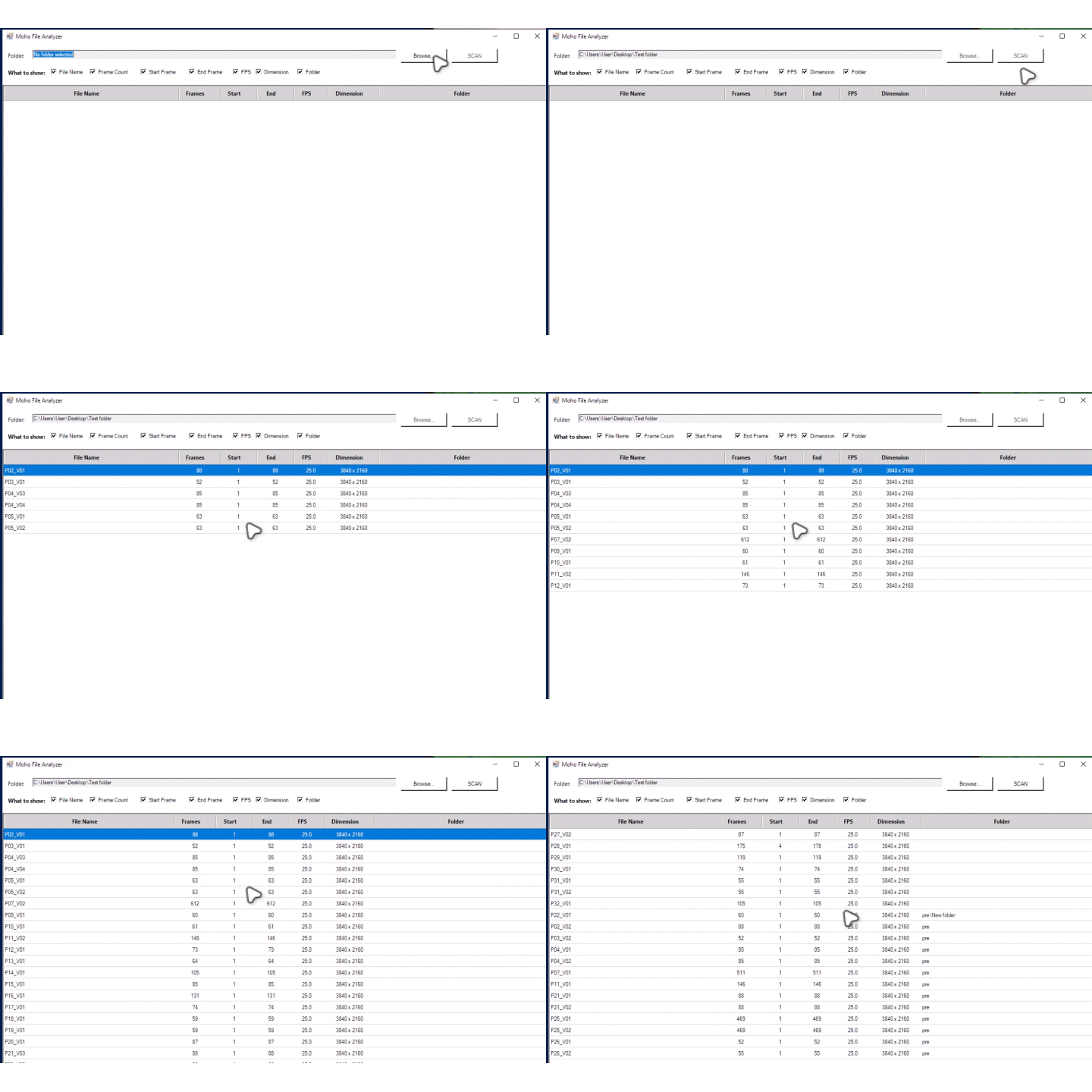 It Shows
Total frame count
Start frame
End frame
FPS
dimension
Moho files inside subfolders
How to Use
Right-click the .ps1 file.
Select Run with PowerShell.
Browse and select your project folder.
Click Scan
file :
https://raw.githubusercontent.com/sinah ... ALYZER.ps1
i Hope it helps
Re: I Made a Moho Analyzer
Posted: Fri Aug 14, 2026 9:01 am
by Greenlaw
This looks useful! I'll check it out later today.
Thanks for sharing!

Re: I Made a Moho Analyzer
Posted: Fri Aug 14, 2026 12:09 pm
by Sina.hojati
waiting for feedback

Re: I Made a Moho Analyzer
Posted: Fri Aug 14, 2026 12:19 pm
by Greenlaw
Hi Sina.hojati!
I had trouble running the script. The window appeared briefly and then closed before I could do anything. This is probably the first time I've tried to run a PowerShell script on this computer, so maybe I need to adjust a permissions setting?
I'll revisit this tonight and let you know how it goes.
Re: I Made a Moho Analyzer
Posted: Fri Aug 14, 2026 10:37 pm
by Sina.hojati
Greenlaw wrote: ↑Fri Aug 14, 2026 12:19 pm
Hi Sina.hojati!
I had trouble running the script. The window appeared briefly and then closed before I could do anything. This is probably the first time I've tried to run a PowerShell script on this computer, so maybe I need to adjust a permissions setting?
I'll revisit this tonight and let you know how it goes.
If you can’t download the `.ps1` file, you can simply copy the code and paste it into a Notepad file.
Then save it and change the file extension from `.txt` to `.ps1`.
After that, right-click the `.ps1` file and choose **Run with PowerShell** (the second option).
Hope that helps!
Re: I Made a Moho Analyzer
Posted: Sat Aug 15, 2026 9:28 am
by Greenlaw
Hi!
That's what I did. When running the script, it opens and then immediately closes. I'm guessing it may be a permissions issue on my end, although it does the same thing on two different computers here.
Will investigate and let you know if I get it running here.
Re: I Made a Moho Analyzer
Posted: Sat Aug 15, 2026 9:34 am
by Greenlaw
Hmm...I found the option in PowerShell settings to run as Administrator. When I ran the script (RMB>Run With PowerShell), the PowerShell window now stays open but remains a blank screen. Getting closer, I guess.
Will continue trying and let you know how it goes.
Re: I Made a Moho Analyzer
Posted: Sat Aug 15, 2026 10:02 am
by Sina.hojati
Greenlaw wrote: ↑Sat Aug 15, 2026 9:34 am
Hmm...I found the option in PowerShell settings to run as Administrator. When I ran the script (RMB>Run With PowerShell), the PowerShell window now stays open but remains a blank screen. Getting closer, I guess.
Will continue trying and let you know how it goes.
I just tested it on a different computer here, and it works flawlessly. I’m not sure what the problem is.
Is anyone else experiencing the same issue?

Re: I Made a Moho Analyzer
Posted: Sun Aug 16, 2026 1:51 am
by Greenlaw
Hi,
This morning, I made a little time to look into this, and the issue may be on my end. Apparently, the script requires PowerShell 5.1, and both my computers have PowerShell 7. I didn't have time to look into this further, but tonight I read the additional info you sent me, and it appears to confirm this. (Thanks for checking.)
If I have time later this week, I'll take another look, but hopefully someone else here can check this out before then.
