Page 1 of 2
accuracy of still (single frame) renders?
Posted: Fri Nov 07, 2008 1:32 am
by basshole
Hi. I'm wondering how accurate the single frame render (command +r) is, in terms of what you see.
Lately, I'm rendering to see what certain effects look like, ones that don't show up in the regular design view (halo, for instance), and I see what I would call "corrupt shapes." Giant blocks of color where they aren't supposed to be, etc. Stuff that looks like it's fine in the regular view, then becomes crap upon a render.
Also having this problem with some text I just made with the draw/text function. Most letters are okay, but then a random "b" or an "n" will just look like triangles and circles.
I'm just wondering if the render is flawed, or if this is actually what I'd get if I started animating this stuff without fixing it first.
Posted: Fri Nov 07, 2008 1:54 am
by funksmaname
i would hope its accurate... i don't know how you're managing to get these glitches, but i've never had problems with the render frame and i rely on it being an accurate representation. I would deffinately work to fix your issues before you animate!
Posted: Fri Nov 07, 2008 4:11 am
by basshole
I don't know where they're coming from either. Sometimes deleting the shape and filling/creating it again works, sometimes I have to actually delete edges/points and draw them again, then create the shape to fix it.
JUst one more annoying thing in the way of getting a project done.
Posted: Fri Nov 07, 2008 4:26 am
by synthsin75
I don't know about the text, but "corrupt shapes" is caused by bad shape creation practices. Like creating shapes while part of it is off screen, deleting points of a shape, and having loops in your curves.

Posted: Fri Nov 07, 2008 4:43 am
by basshole
I may be guilty of some of those. Don't those errors usually show up in the regular view, as opposed to only in a render? Looks like now I'll have to go back through each character and check them, as well as all sub layers of switch layers, etc. etc.
Posted: Fri Nov 07, 2008 7:04 am
by chucky
hey Synth what's wrong with deleting points?
This is a scary one, I do it all the time and if I shouldn't then I would be seriously worried about the practicality of ASPRO.
Does it cause leaking fills? Like straight lines of fill that cut across shapes in concave areas?
Posted: Fri Nov 07, 2008 9:46 am
by heyvern
Chucky,
If you have complex shapes with cross section splines and lots of connection points that make up a shape and you delete points without looking at how the shape is constructed this can lead to those strange artifacts.
For example a distinct single shape is defined by a closed mesh with at least 2 points on a side ("corners" like a box. Minimum number of points for shapes that share an edge). Sometimes shapes share a side with another shape. If you delete points in such a way that causes that shape to not meet the requirements of a "legal" shape you can cause it to go wonky like that.
Another example would be a "checker board" effect. If you create a grid of points with the minimum number of points (single point at each vector crossing) you can't select alternating "boxes" in the grid to create a shape. Each checkerboard box has to be a distinct shape... or at least each shape has to be separated by more than those 2 points they share on a corner. Deleting point after creating a complex group of shapes could cause some problems.
Also lots of shapes that share edges and points internally and cross over each other... you start deleting points you can get some very strange results that AS doesn't like.
Now that I understand what causes it, it hasn't happened to me in ages and even when it did it was a rare occurrence. You CAN delete points but you need to keep an eye on what is happening to the shapes as you do it.
----
I'm not totally convinced that is what is happening in this case but without a file to look at or more info I can't say for sure. The text tool never gives me problems and would not create "bad shapes" since it is an "automated" process. However, I suppose a bizarre, or unusual font might cause this to happen.
-vern
Posted: Fri Nov 07, 2008 12:55 pm
by basshole
Would you like to see the file? I'd have to upload it to my server. . .it's too large for email at this point.
I too have deleted points on shapes, but usually if it's gonna cause problems you see it immediately, it seems.
Changing fonts seemed to fix the issue. It didn't seem to like the font I was using. I"ll get back to you on which one it was.
Posted: Fri Nov 07, 2008 1:44 pm
by heyvern
Some fonts can be very complex when they are converted to outlines. The text feature in AS has double trouble because not only does it need to convert to outlines it has to do additional conversion due to the difference between postscript curve descriptions and AS curves.
A very complex font with lots of weird curly cues and odd shapes could cause trouble.
If you can post the problem file it would be of interest to me. I like to see problems like this first hand to expand my experience and knowledge of how they happen and how to fix them.
-vern
Posted: Fri Nov 07, 2008 1:58 pm
by synthsin75
Yeah Chucky, Vern answered that much more eloquently than I could have.
Shape artifacts are rarely seen in the workspace preview. Hell, sometimes they aren't even visible until the character or shape gets moved just right during animation. As long as you can learn what causes these, you'll be able to avoid them in the future.
Like Vern, I rarely run into this problem anymore.
Posted: Fri Nov 07, 2008 2:50 pm
by basshole
Well, regarding the fonts, the one that was giving me issues was very basic. . .haragino gothic regular w6 or something, and the new one ,cooper black regular, is also pretty basic. I'll move on to verdana if this one gives me issues.
I will upload the file later.
Can you elaborate on what you meant earlier by: creating shapes while part of it is offscreen
Are you saying that if you already have your points all connected, and then you actually create/fill the shape while you're zoomed in too far to see the whole thing, or if the view is causing it to be cut off somehow, that creates issues?
Posted: Fri Nov 07, 2008 5:08 pm
by Genete
In text accuracy I think that basshole has reason.
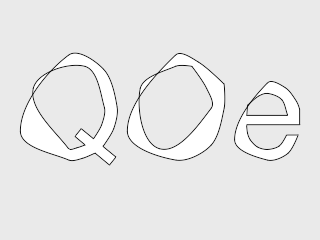
I don't know what happen but I see the algorithm to render fonts worse than the previous versions I've run of Anime Studio.
Posted: Fri Nov 07, 2008 5:18 pm
by KenW
I too have had occassional problems with standard fonts. The "O's" in particular sometimes are a little disfigured.

Posted: Fri Nov 07, 2008 6:00 pm
by basshole
for me it was B's (capital B) and N's. Actually, now that I think on it, on the shape I was recently taken surprise by, I may have deleted edges and then refilled it or something else. I'll post the file if I have further problems, but for now I'll just assume that I've set many booby traps for myself and see if I can track them down and disarm them.
Posted: Fri Nov 07, 2008 7:47 pm
by synthsin75
Can you elaborate on what you meant earlier by: creating shapes while part of it is offscreen
If you select all but a few points of a shape you plan on creating and then zoom in or pan so that these unselected points are off-screen, it will allow you to make a filled shape. But because it is not actually a whole closed shape, it will cause artifacts.
It may look like a fairly valid shape, just kind of ending at the last actual selected points used to create it. But animating these 'bad shapes' will usually show them to be bad.