How to prevent distortion?

Wondering how to accomplish a certain animation task? Ask here.

Moderators: Víctor Paredes, Belgarath, slowtiger

Post Reply
YoungKingYugo
Posts: 1
Joined: Fri Dec 26, 2025 4:23 pm

How to prevent distortion?

Post by YoungKingYugo »

Hello! As a beginner I have been running into a confusing issue.

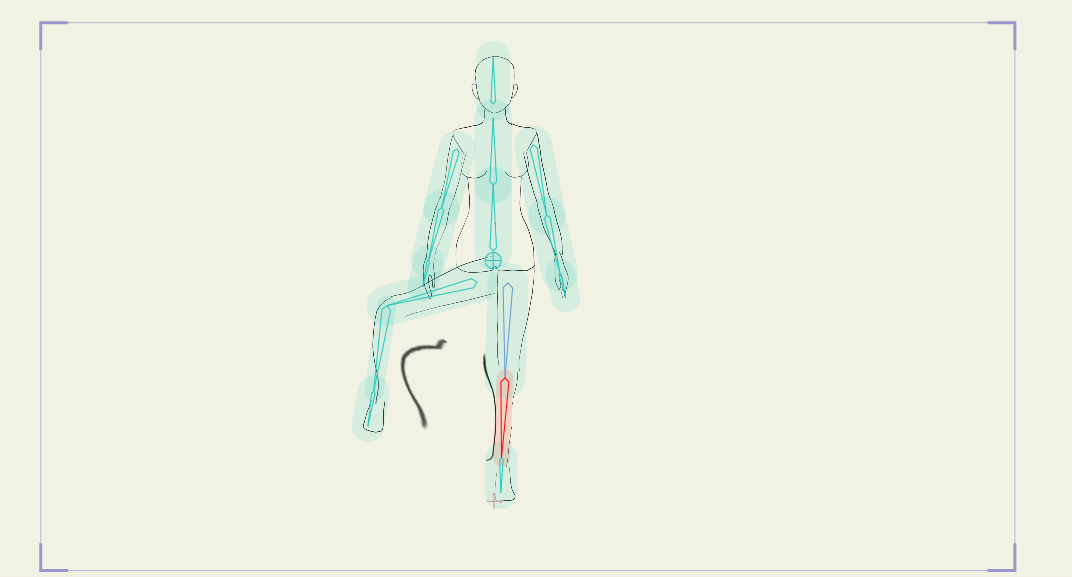
I have been trying to learn Moho, specifically on learning about rigging PSD files, because I am more comfortable drawing up characters in Krita, and part of my learning process to see how things are done has been trying to rig a basic human outline. I have tried a few times now, following a tutorial, to add bones to the figure but everytime something goes wrong with the legs when I try to manipulate the bones. The leg always gets distorted, specifically the shin area (you can see from the image link at the bottom hopefully). What I dont understand is why this is happening? The arm doesnt have this issue, and it is structured in the same way as the leg (I divided the uppper arm and forearm in my psd layers and used the create smooth joint for bone pair function after selecting both bones while on the uppper arm layer, and the whole arm functions as I would expect, but the leg which is divided into a thigh and shin area, with the thigh layer having been selected when the create smooth joint for bone pair function was activated results in this weird distortion when manipulating the bones in the bone layer). Did I do something wrong in my layers? I did go a bit ambitious for a beginner in trying the seperate so many layers, but I wanted to test the flexibilty of moho and if this was the issue why isnt the arm effected the same way? I tried changing bone strength but this did nothing to the issue, I also tried highlighting the leg bones and use the all bone for flexibinding function but this just seperated the bones of the legs completely from the actual drawing.

If possible I would also like to understand one other thing, when playing with switches, how is structure maintained in an image? By that I mean, I drew the figure's torso in multiple perspectives but I only drew one set of arm perspectives for each arm. The arms align well with the front facing perspective because that is how they were drawn to match in Krita, however when switching torso perspectives to side facing, the arms remain as they would to the front facing view and so completely disconnect from the torso in any other perspective. I am not sure about how to go about addressing this as the tutorial I am following achieves this through some black magic they dont explain. Am I supposed to redraw the arms for the different perspective and use swtiches for those too or can I connect them somehow to match each perspective? I have attached a second image of what I mean.

Any help would be appreciated and I can provide more information for better clarity too.
Image
Image
User avatar
Greenlaw
Posts: 10703
Joined: Mon Jun 19, 2006 9:45 am
Location: Los Angeles
Contact:

Re: How to prevent distortion?

Post by Greenlaw »

Hi,

At this moment, I can’t read your entire post (sorry, busy this morning,) and will come back to read it completely later today. However, it sounds like you’re struggling unwanted bones distortions on your artwork. The short answer is to use Link Bones (called Use Selected Bones For Flexi-binding in older versions of Moho.)

The idea with Link Bones is to limit which bones can affect selected art layers, so other bones in the rig are not affecting them. To learn more about this, I recommend watching my tutorial on Bone Binding methods here…

Moho Basics! Learn The 5 Bone Binding Methods!

Hope this helps.
Animations, Tutorials, and Cats (Oh, My!) Little Green Dog Channel on YouTube!

D.R. Greenlaw
Artist/Partner - Little Green Dog
Little Green Dog Channel | Greenlaw's Demo Reel Channel
User avatar
hayasidist
Posts: 3942
Joined: Wed Feb 16, 2011 11:12 am
Location: Kent, England

Re: How to prevent distortion?

Post by hayasidist »

YoungKingYugo wrote: Mon Jan 05, 2026 7:28 am
I have tried a few times now, following a tutorial, ...
which tutorial? If it isn't making something clear, it might be that explaining what it's trying to say in a different way would remove the confusion.
YoungKingYugo wrote: Mon Jan 05, 2026 7:28 am If possible I would also like to understand one other thing, when playing with switches, how is structure maintained in an image? By that I mean, I drew the figure's torso in multiple perspectives but I only drew one set of arm perspectives for each arm. . Am I supposed to redraw the arms for the different perspective ..
Yes. And the same for the legs. You need a full set of components drawn for each view. An easy way to see this is if you take a look at the Character Wizard (CW) in Moho. That nominally has 8 views (45 degrees separate each one) with each is in its own (independent) rig. But (through laziness or economy) it assumes that the character is symmetrical so it only creates one profile (side) assuming that the user will flip the layer to have it face the other way. Same for the rear 3/4 and front 3/4. So it only exports 5 rigs.
There are a few other ways of managing these separate perspectives, but the CW chooses to have a whole rig as the thing that can be switched. Without knowing what the tutorial you're trying to follow is saying, it's difficult to know which approach your tutorial is suggesting.

But yes - bottom line - you'll need one of everything for the different views; however, you can aim to reuse as much artwork as possible - and by reuse that means (e.g.) copy and adapt a drawing rather than starting from scratch.
Post Reply