

Clear Animation From Layer/Document EXCEPT...

Discuss ideas for new features with other users. To submit feature requests to Smith Micro, please visit support.smithmicro.com

Moderators: Víctor Paredes, Belgarath, slowtiger

Post Reply
User avatar
bintykins
Posts: 36
Joined: Sun Jun 12, 2016 10:59 am

Clear Animation From Layer/Document EXCEPT...

Post by bintykins »

Would it be at all possible to have a way to lock an animated layer?


I love Clear Animation, it's awesome.
But with the mantis shrimp update I'm finding a usecase for locking some layers, so we can have a cycling opacity/drift on a layer that is extra to the global lineboil/noise settings. (love those too)

Unless there is a way I don't know yet, I use markers to warn against clearing anim. But even I sometimes forget and then I find out I deleted my cycle (esp Clear Animation From Document) ((has anyone written a script for this))
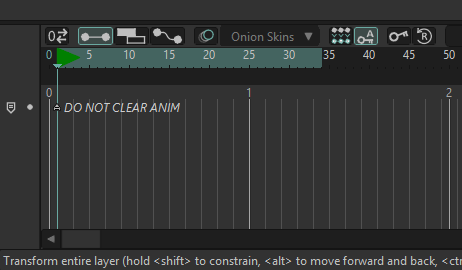
Image

I save it in an action, that's my workaround, so it's easily retrievable, but I would love to lock a layer 🤞🤞🤞
Yours lovingly..
User avatar
synthsin75
Posts: 10441
Joined: Mon Jan 14, 2008 2:20 pm
Location: Oklahoma
Contact:

Re: Clear Animation From Layer/Document EXCEPT...

Post by synthsin75 »

My lock layer script wouldn't be able to stop clear animation from document. All we can do with scripting is keep you from editing a locked layer directly.
User avatar
bintykins
Posts: 36
Joined: Sun Jun 12, 2016 10:59 am

Re: Clear Animation From Layer/Document EXCEPT...

Post by bintykins »

Ah dang it 😩 maybe Moho will see this and add something 🤞🤞🤞

I didn’t know you’d written a lock layer script that’s still SO HANDY! Can you use that to lock Reference Layers?? Editing them directly is often a common error! I will seek this out anyway, thanks so much!
User avatar
hayasidist
Posts: 3978
Joined: Wed Feb 16, 2011 11:12 am
Location: Kent, England

Re: Clear Animation From Layer/Document EXCEPT...

Post by hayasidist »

The Clear Animation menu item doesn't seem to come as a Lua file (meaning it isn't there to be modified, and so the menu item will still be there even if a new tool is created) - but it should be possible to script what you want - i.e. if the layer is locked, then the replacement tool can check this and not delete animation in it.

BUT, IMO, this is a trivial change - somewhere in the guts of the factory tool will be loop such as:

for this layer, for all channels, AminChannel:Clear...

and (famous last words) all that's needed is to check the layer lock before launching into the channel clearing code.
User avatar
Greenlaw
Posts: 10866
Joined: Mon Jun 19, 2006 9:45 am
Location: Los Angeles
Contact:

Re: Clear Animation From Layer/Document EXCEPT...

Post by Greenlaw »

bintykins wrote: Tue Mar 17, 2026 2:27 pm I didn’t know you’d written a lock layer script that’s still SO HANDY!
Yeah, it's awesome! Here's the original forum topic:

viewtopic.php?p=167236#p167236

If you're using it in a team production, make sure everyone has the script installed.
Animations, Tutorials, and Cats (Oh, My!) Little Green Dog Channel on YouTube!

D.R. Greenlaw
Artist/Partner - Little Green Dog
Little Green Dog Channel | Greenlaw's Demo Reel Channel
Post Reply
