
Using AS as a non-linear video editor
Moderators: Víctor Paredes, Belgarath, slowtiger

Done a few tests and not that happy with the rendering from AS when its rerendering a movie. Best way to get decent quality is rendering double the size movie, bringing in again and setting project properties to double-size again, and then reducing to PAL for final export, and still image quality's a little blurry. I was comparing a rendered PNG still to uncompressed Quicktime rendered out, brought in again to AS and rendered out a still. Didn't touch the camera or anything but there's still blurring. If you're not too concerned with image quality then its no problem, but I figure if I've kept everything hi-res up until now why settle for sub-par quality, so I might end up using After Effects. Dayeem pricey whoo. But I can see the wave form clearly to match up beats and I can edit with more precision and it seems to be a little faster in AE.

I wouldn't recommend AfterFX, unless you really need its effects. As a video editor it is complete overkill. You should consider your options and cmpare the prices:
After FX - pricey (at least in Europe: 1.349,00 EUR)
or the following combination:
Final Cut Studio 999,00 €, Final Cut Express 4.0 199,00 € (Express is good enough, already did HD with it)
+ TVP Animation 9.0 Pro 950 € - frame-by-frame animation
But it all depends on your very own needs.
After FX - pricey (at least in Europe: 1.349,00 EUR)
or the following combination:
Final Cut Studio 999,00 €, Final Cut Express 4.0 199,00 € (Express is good enough, already did HD with it)
+ TVP Animation 9.0 Pro 950 € - frame-by-frame animation
But it all depends on your very own needs.
Thanks Slow. You may have saved me a bunch o bucks.
I don't really need all the effects of AE. I need to be able to place clips along the timeline and have them stay there, not like iMovie which has ripple effects if I edit something earlier on the timeline.
I also need to be able to see the waveform clearly to match and synch up beats with the video. And if FCE recognizes an alpha channel so I can add backgrounds to alpha'd video that'd be great.
Looking at prices now, but if you know that FCE does all of this, please lemme know! Thanks,
Mike
I don't really need all the effects of AE. I need to be able to place clips along the timeline and have them stay there, not like iMovie which has ripple effects if I edit something earlier on the timeline.
I also need to be able to see the waveform clearly to match and synch up beats with the video. And if FCE recognizes an alpha channel so I can add backgrounds to alpha'd video that'd be great.
Looking at prices now, but if you know that FCE does all of this, please lemme know! Thanks,
Mike
I do all my stuff with Final Cut Express 4.0. It does PAL as well as HDTV (one has to be careful choosing the right options, though, it's a biut tricky.) You have a virtually unlimited number of video and audio tracks. It recognizes alpha both in video and stills. And it has a long lists of in-built effects just as good as After Effects.
The audio waveform is visible in one view so you can set in and out points exactly, although not throughout the timeline, I think. You will work a lot with markers instead.
The audio waveform is visible in one view so you can set in and out points exactly, although not throughout the timeline, I think. You will work a lot with markers instead.
Thanks for the reply.
I've looked at a couple of YouTube videos and I've seen the tilda marking way of doing things.
But its not that precise I'd imagine.
So what I'd like to do is be able to view the song or a clicktrack, and I can see clearly on the clicktrack where the beat falls and I know which frame corresponds with the beat. Would I be able to do this on Final Cut Express? I need to match up the frame of video with the beat exactly and cut exactly on the beat.
I plan to render out as AS with uncompressed video and bring it into FCE, and then edit the clips down and match them to a clicktrack, and then add the song and render out.
AS' editing tools are fine for this but the image quality suffers when re-rendering video, and iMovie's quality is great but its editing tools drive me a bit nuts. It'd help if everything didn't ripple edit in a linear way. Nyeeargh.
I guess I could plan everything out carefully, put a couple AS files in the timeline, render out a big chunk, then have about 5 chunks to bring into iMovie and they'd snap together like neat Lego blocks, but if I want to change just one scene in one of those 5 blocks, that means doing a little change and then rerendering a whole block, which would be about 10 scenes. Not ideal.
Thanks for taking the time to answer these questions. It helps to have someone who actually uses the software.
I've looked at a couple of YouTube videos and I've seen the tilda marking way of doing things.
But its not that precise I'd imagine.
So what I'd like to do is be able to view the song or a clicktrack, and I can see clearly on the clicktrack where the beat falls and I know which frame corresponds with the beat. Would I be able to do this on Final Cut Express? I need to match up the frame of video with the beat exactly and cut exactly on the beat.
I plan to render out as AS with uncompressed video and bring it into FCE, and then edit the clips down and match them to a clicktrack, and then add the song and render out.
AS' editing tools are fine for this but the image quality suffers when re-rendering video, and iMovie's quality is great but its editing tools drive me a bit nuts. It'd help if everything didn't ripple edit in a linear way. Nyeeargh.
I guess I could plan everything out carefully, put a couple AS files in the timeline, render out a big chunk, then have about 5 chunks to bring into iMovie and they'd snap together like neat Lego blocks, but if I want to change just one scene in one of those 5 blocks, that means doing a little change and then rerendering a whole block, which would be about 10 scenes. Not ideal.
Thanks for taking the time to answer these questions. It helps to have someone who actually uses the software.
OK, since I haven't used this workflow yet I just did a test, loaded a soundfile into FC and searched for the right setting. It's easy, it's just one of the general viewing options: "Show audiotrack as waveform". The timeline looks, when completely expanded, like this:
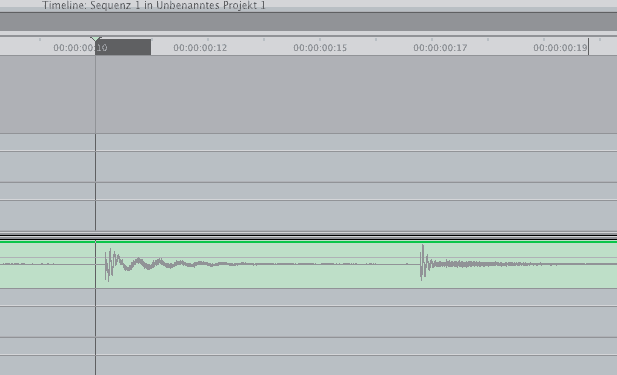
See the grey part right to the time cursor line? That's exactly one frame.
See the grey part right to the time cursor line? That's exactly one frame.
