HD Export problem

General Moho topics.

Moderators: Víctor Paredes, Belgarath, slowtiger

Post Reply
Debo
Posts: 63
Joined: Tue Feb 26, 2008 2:26 pm

HD Export problem

Post by Debo »

I've gone and went for the 'upgrade': Anime Pro 6.

Right away, I've encountered my first problem, and I'll show you what it is.

In AS5, I work in 1920x1080. Export using the Animation codec, which to me is the only acceptable one. I don't draw in AS, but I import images: .PNGs, 1920x1080, usually from Photoshop where I take all my scanned drawings first. (And I have a Mac.)

Hearing that AS6 now has an "HDTV" option, I decided to upgrade.

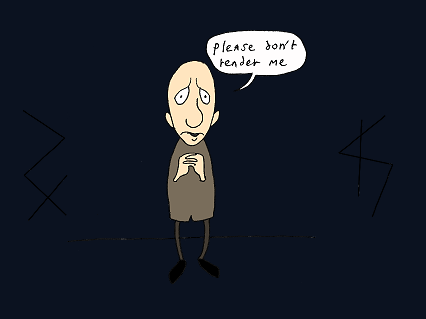
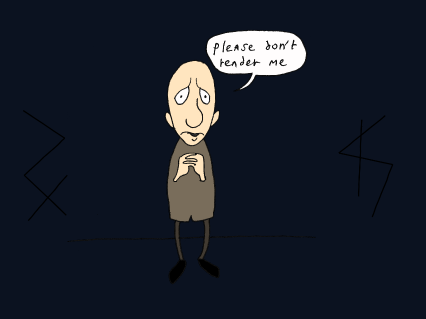
Now compare these. I've drawn this thing especially to prove my point and hope it will come across --

The upper drawing (TP6) was rendered with AS6, HDTV 1920x1080. The lower drawing (TP5) uses the same resolution, but was rendered with AS5. Take a close look, and you'll see that TP6 is slightly blurry when you compare it to TP5.

Image

Image

(Both drawings also have that bloody white line at the left that I despised so much in AS5: obviously one thing that didn't upgrade with the 'upgrade'.)

If these aren't clear for you, I can e-mail them in their original size (1920x1080) if you want. But in any case you should definitely see at least a difference when looking at the 'cross' at the left of the figure. Imagine a busier drawing, and the difference would be even greater -- I have some scenes where characters are in the distance: in AS5 you see their faces, in AS6 you don't.

This blurring happens no matter what codec or resolution I use, and no matter how I export.

But what is this?
User avatar
slowtiger
Posts: 6337
Joined: Thu Feb 16, 2006 9:53 am
Location: Berlin, Germany
Contact:

Post by slowtiger »

Either you accidentially uploaded the same pic twice, or this is an early April's Fools attempt. I put these two on top of each other in Photoshop and there is no difference.

If we are to judge the quality, it would be better if you just cut out the same area from both images and post them here in 1:1 size, instead of reducing them.
User avatar
Mikdog
Posts: 1901
Joined: Tue Jul 05, 2005 7:51 am
Location: South Africa
Contact:

Post by Mikdog »

Dude.
Debo
Posts: 63
Joined: Tue Feb 26, 2008 2:26 pm

Post by Debo »

There IS a difference, people. On both my iMac and my old PowerBook. You can see it even in this reduced size, no doubt about it. I'm surprised you don't see it. You don't have to be a professional or have 20/20 vision.

When you compare them, like in Photoshop, look at the LINES. They give it away. Closely inspect the ink lines. The cross, the end of the line the character is standing on, anything.

I wouldn't go through all this trouble if I wasn't 100% sure.

Save them, rename them, juggle with them, send them back to me and I can guarantee you I'll be able to tell which is which.

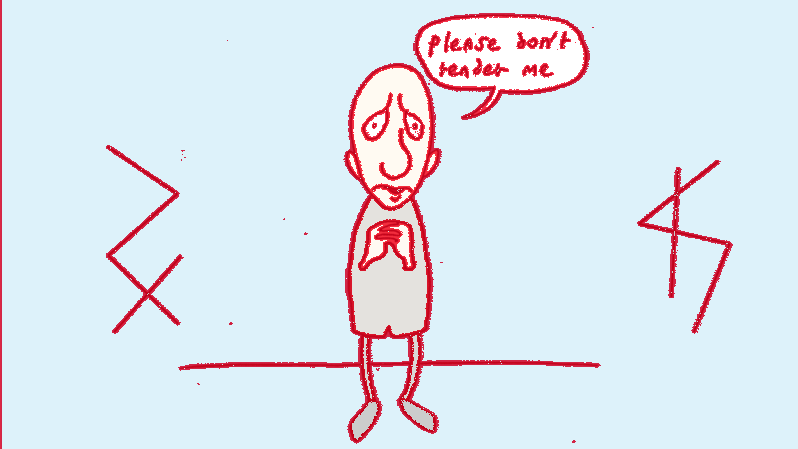
Again two examples, same character (this detail: 1/1):

Image

Image

The nose line between his eyes. The lettering. The fingers. The line he's standing on. Just everything.

Like I said, I'm willing to send you the images in their original size if you really need that to be able to tell they're different. Although I'm quite shocked you can't see it.
User avatar
slowtiger
Posts: 6337
Joined: Thu Feb 16, 2006 9:53 am
Location: Berlin, Germany
Contact:

Post by slowtiger »

OK, whereas the first pair of images was identical, possibly due to resizing, the second pair is different.

It looks like your v6 image has been sharpened, and the v5 image not.

So I did a test myself, made an image in Photoshop with thin black lines on colour, in 1920x1080, and imported it into an AS file of the same size. I didn't move the image in AS, just left it where it came in. Rendered in 5.6 and in 6.1, both with antialiased edges checkedand put all results again into the same file in PS.

There is a difference. Both renders seem to be a tiny bit enlarged compared to the original - something like 0,1%, only visible as a jump of not even a whole px on the right side.

Both renders are smoother than the original, and the v6 one more so than the v5. I assume this is the result of the tiny change in size. I further suspect this comes from some glitch in setting the Z position of an imported image to some value slightly bigger than 0.

I don't get the sharpened result you have. Are you sure you haven't used different quality settings?
Genete
Posts: 3483
Joined: Tue Oct 17, 2006 7:27 am
Location: España / Spain

Post by Genete »

Honestly I didn't see any difference so I used the computer to do it. I saved the two first images and use compare and composite from Imagemagick package to see the difference between the files:

Just a straight:

Code: Select all

$ compare TP61.png TP51.png compare-std.png
gives me:
Image

Another type of comparison:
Composite with the difference method over a grey scale.

Code: Select all

$ convert TP61.png TP51.png -compose difference -composite -colorspace gray difference_gray.png
Constant stretch the result to enhance it.

Code: Select all

$ convert difference_gray.png -contrast-stretch 0 difference_norm.png
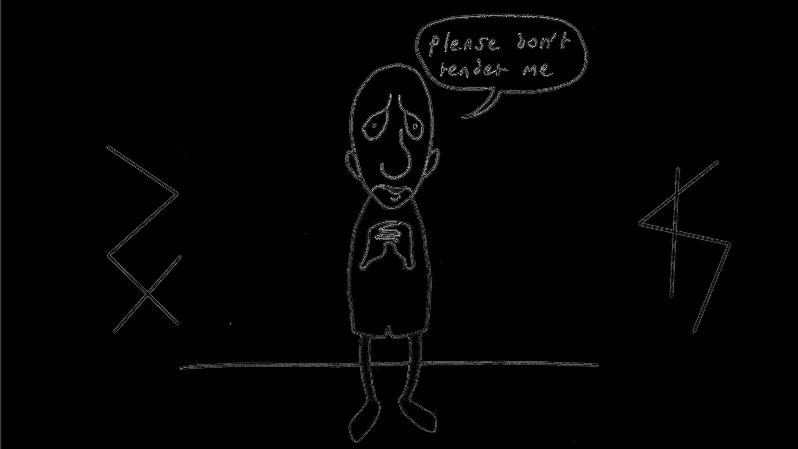
I obtain this:
Image

Notice the mentioned vertical line on the left and the blurred pixels around the lines. Also the spots surprised me!.

It reminds me something about the enable 3D camera. Maybe you have it disabled by default in AS 5.6 and it is enabled by default in 6.0? It makes a difference.

-G
Debo
Posts: 63
Joined: Tue Feb 26, 2008 2:26 pm

Post by Debo »

I checked, but in both apps the 3D camera is enabled. Just as a test, I exported a bit of film with the 3D camera off, but it made no difference.

I've also tried to export it as 1921x1080, but again, blurry lines. I've tried a lot of different options, but nothing I do gets the same sharp result as my 5.6 output.

The settings in both versions are the same too.
User avatar
Lost Marble
Site Admin
Posts: 2369
Joined: Tue Aug 03, 2004 10:02 am
Location: Scotts Valley, California, USA
Contact:

Post by Lost Marble »

Hi Debo,

I'm currently looking into what's going on here. It would help if you could tell me the exact build number of your version 5.6 application (this is on a Mac, right?). To find the build number, choose "About Anime Studio" from the Help menu, and look in the bottom-left corner of the About box. You'll see something that looks like "Build 20080406p" - the exact numbers may be different, so if you could share what you see there that will tell me something.

-Mike
Debo
Posts: 63
Joined: Tue Feb 26, 2008 2:26 pm

Post by Debo »

Hi Mike,

The 5.6 build is: "Build 20080407p".

(For what it's worth, this is AS 6.2's build: "Build 20100225p".)
User avatar
Lost Marble
Site Admin
Posts: 2369
Joined: Tue Aug 03, 2004 10:02 am
Location: Scotts Valley, California, USA
Contact:

Post by Lost Marble »

Thanks - I'll post here again tomorrow with some more information about this issue.
User avatar
Lost Marble
Site Admin
Posts: 2369
Joined: Tue Aug 03, 2004 10:02 am
Location: Scotts Valley, California, USA
Contact:

Post by Lost Marble »

OK, I'm back. The version 5 image is in fact a little bit sharper. We will address this in a future release to improve the sharpness.

In the meantime, this is what I can suggest:

1. Ignore it. Sorry, I don't mean to dismiss your concern (I will be working on it), but until we can address the issue I think you need to consider whether anyone will really notice. A zoomed in still image is one thing, but an animation with characters and objects moving around is another - will it really affect your audience's experience?

Please don't think I'm being flippant. If it bothers you enough that you can't ignore it, then that's the way it is. And I will do my best to address it. But since I can't give you a fix today, I think you should really consider whether your audience will see it the same way as you do.

2. If you have a video editing application, maybe you could run a post-processing sharpen filter after you export from Anime Studio.

3. If it's really unbearable, you can contact Smith Micro customer service about a refund. I'm not sure when you purchased the product, but they should be able to help you through that process.

-Mike
Debo
Posts: 63
Joined: Tue Feb 26, 2008 2:26 pm

Post by Debo »

Thanks for taking the time to look into it.

1. I see your point, but yeah: the issue bugs *me*, even if the audience may not be aware of it. I will know the difference and won't be at ease with it. Also, I plan on making a web version of the eventual film, and consequently it'll have to go through a couple of codecs and apps, which means quality loss, and naturally that won't do the already slightly blurry image any good.

The images I use in my film are often highly-detailed and quite complex, so I see the blurry lines everywhere -- especially in the stills.

2. That was one of the first things I tried, but, as it goes, the filter also sharpens elements that mustn't be sharpened. That, and it's a ton of extra work on a film that's at a relatively advanced stage.

3. ...Which means I'll have to ask for the refund. I'll check back at each update (though I suppose I shouldn't expect anything before 6.5 or even 7), and see if it's still there. AS has been so incorporated into my workflow that I don't really want to try out anything else either (I already tried out several of the other apps two years ago and picked AS for a reason.)

But thanks for helping to find a solution. At least the issue is being acknowledged and addressed, which is good to know. Also good to know is I might have helped making the app just a little better in the future.
Post Reply