

Is there a way to make the bounding box of the Transform Points tool align with the object being deformed, instead of always staying aligned to the screen?
When I’m working with mesh, I often need the bounding box to match the mesh orientation, not the screen orientation. I searched all morning but couldn’t find anything in the tutorials or documentation. It seems like this feature exists in Illustrator, but I’m not sure if Moho has something similar.
My current workaround is to keep the object and the mesh level horizontally, and only use bones with keyframes when I need rotation. But this becomes very difficult to manage during binding, so I’m hoping there might be a way to reset or re-align the bounding box directly.
If anyone knows a method or hidden option for this, I’d really appreciate it. Thanks!
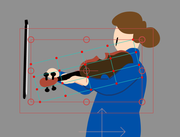 from this
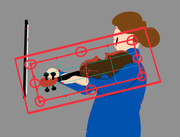 to this
P.S.: Sorry, English is not my first language. I used ChatGPT to help with the translation, so please forgive me if anything sounds unclear or unnatural.





 thank you all so much for the warm and detailed replies! Sorry for the slow response — it’s been a few busy days.

