Parental Bone change in Actions: crash when deleting a Bone (Bones ID issue)

Discuss Moho bugs (or suspected bugs) with other users. To report bugs to Smith Micro, please visit support.smithmicro.com

Moderators: Víctor Paredes, Belgarath, slowtiger

Post Reply
Quentin.F
Posts: 4
Joined: Thu Apr 23, 2026 2:39 am

Parental Bone change in Actions: crash when deleting a Bone (Bones ID issue)

Post by Quentin.F »

Hello there, here is my first bug report:

I'm using Moho v14.4 on Windows 11, and I've a bug while changing a Bone's Parent through an Action then deleting another Bone, here is my scenario:
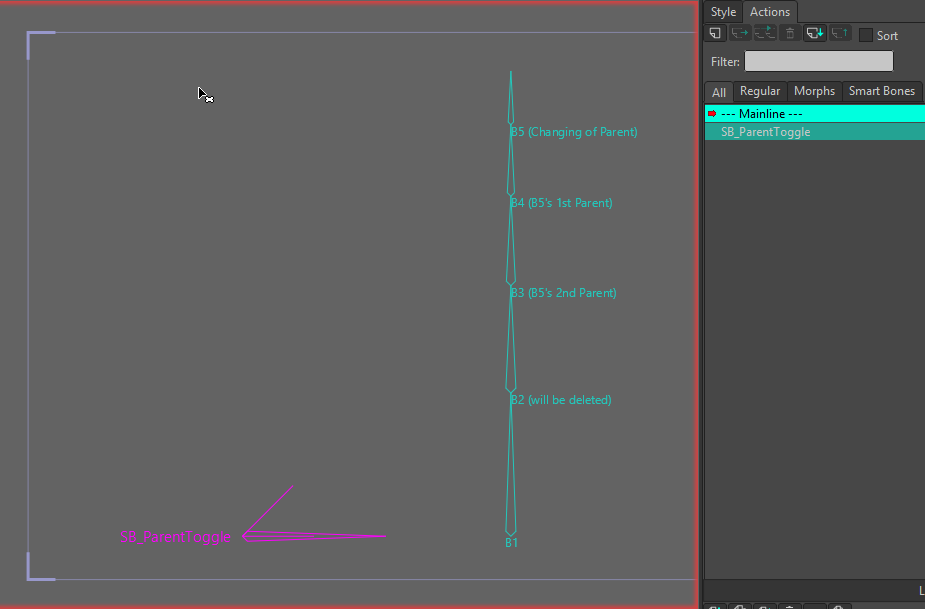
  • I create a Bone chain with B1→B5 Bones. B5 is the last child.
  • I create a Smartbone that controls the parenting of B5: first it's B4, then it's B3.
Until here, everything is OK.
Image
  • On frame 0, I delete the Bone B1 or B2 (with a smaller Bone ID than B5's one).
    (I use MR_Inspector to track the Bone IDs changes.)
  • Since then, if I try to edit the Action, Moho crashes.
The only solution I've found is to delete the Action that makes Moho to crash, and to recreate it's content with the new Bones IDs.

If anyone has a solution, other than not using Parental changes in Actions, that would be much appreciated and I'd be very happy to hear about it : )

Quentin

PS: you can find my 2 sample projects (without then with B2 deleted) here: https://drive.google.com/file/d/1GIjXMG ... sp=sharing.
User avatar
Greenlaw
Posts: 10984
Joined: Mon Jun 19, 2006 9:45 am
Location: Los Angeles
Contact:

Re: Parental Bone change in Actions: crash when deleting a Bone (Bones ID issue)

Post by Greenlaw »

I don't think I've ever gotten reparenting to work satisfactorily in a Smart Bone Action. For me, I believe the result I typically got was undesired placement of the bone...and probably crashing. Not sure about the latter, but that seems about right.

Instead, I use Vitruvian Bones. You can get VBones to swap to an unparented version of a bone. The technique is just a little more involved, and it works perfectly.

Sidenote: Before we got Vitruvian Bones in Moho, I used animated visibility to switch to a version of the artwork parented to a different bone, but this left both bones visible. Using Vitruvian bones solved this issue.
Animations, Tutorials, and Cats (Oh, My!) Little Green Dog Channel on YouTube!

D.R. Greenlaw
Artist/Partner - Little Green Dog
Little Green Dog Channel | My DreamWorks Animation Reels & Others
Quentin.F
Posts: 4
Joined: Thu Apr 23, 2026 2:39 am

Re: Parental Bone change in Actions: crash when deleting a Bone (Bones ID issue)

Post by Quentin.F »

Greenlaw wrote: Sun May 31, 2026 7:44 am I don't think I've ever gotten reparenting to work satisfactorily in a Smart Bone Action. For me, I believe the result I typically got was undesired placement of the bone...and probably crashing. Not sure about the latter, but that seems about right.

Instead, I use Vitruvian Bones. You can get VBones to swap to an unparented version of a bone. The technique is just a little more involved, and it works perfectly.

Sidenote: Before we got Vitruvian Bones in Moho, I used animated visibility to switch to a version of the artwork parented to a different bone, but this left both bones visible. Using Vitruvian bones solved this issue.
Thanks a lot for your answer, Greenlaw.

I succeeded to got reparenting to work satisfactorily in a Smart Bone Action, even if it's not really a straight process (I had to correct things and re-check if everything is OK multiple times before to get it to work).
So maybe I'm already at the limite of Moho's stability.

Sadly, the alternative possibility you proposed, Vitruvian Bones, won't work with my Rig for this part.
Indeed, I use the reparenting to somehow toggle the Independent Angle property on/off on the neck, pelvis and shoulders (in order to have a volume behavior of those elements while rotating their parent Bones). It is too much central in the Rig to use Vitruvian Bones here. And idem for animating visibility.
So it's a pity that the Independent Angle property could not simply be keyframed. That would be a solution way cleaner.

I think I'm going to have to disable this functionality, as it's not vital for my Rig. And I'll brief the animators how to animate the reparenting by hand.
The Action was way much easy to use, because it's not an easy task to find the proper Bone to select for reparenting, as I've many Bones at the exact same place ( I had to change their lengths to be able to distinguish the different Bones).
That would be easier too if it would be possible to choose a parent using a list, instead of being obliged to click on the Bone.
Does this functionality exist in Moho ?

User avatar
synthsin75
Posts: 10488
Joined: Mon Jan 14, 2008 2:20 pm
Location: Oklahoma
Contact:

Re: Parental Bone change in Actions: crash when deleting a Bone (Bones ID issue)

Post by synthsin75 »

Quentin.F wrote: Sun May 31, 2026 9:00 am That would be easier too if it would be possible to choose a parent using a list, instead of being obliged to click on the Bone.
Does this functionality exist in Moho ?
The select bone tool has a dropdown to select by bone name.
User avatar
Greenlaw
Posts: 10984
Joined: Mon Jun 19, 2006 9:45 am
Location: Los Angeles
Contact:

Re: Parental Bone change in Actions: crash when deleting a Bone (Bones ID issue)

Post by Greenlaw »

Quentin.F wrote: Sun May 31, 2026 9:00 am The Action was way much easy to use, because it's not an easy task to find the proper Bone to select for reparenting, as I've many Bones at the exact same place ( I had to change their lengths to be able to distinguish the different Bones).
Yes, I hear you! I finished a job a couple of months ago where I ran into the same situation. The Select Bones list Wes mentioned works, but in my case, there were hundreds of bones in it, making it cumbersome to find and select a bone. :?

What I wound up doing was using multiple instances of Vitruvian Bones operated by a Smart Bone dial. This worked for me, but the setup was complicated for what I was using it for.

Managing a large number of items, such as Bones, Styles, Actions, etc., is a problem I run into regularly in Moho. I'm hoping that a future version of Moho will offer better organizational tools.

Tip regarding the Select Bones list: I can get by when I name my bones so they sort into groups alphabetically. Unfortunately, this system does not work in the Constraints bone lists, where bones are listed in their creation order.
Animations, Tutorials, and Cats (Oh, My!) Little Green Dog Channel on YouTube!

D.R. Greenlaw
Artist/Partner - Little Green Dog
Little Green Dog Channel | My DreamWorks Animation Reels & Others
Quentin.F
Posts: 4
Joined: Thu Apr 23, 2026 2:39 am

Re: Parental Bone change in Actions: crash when deleting a Bone (Bones ID issue)

Post by Quentin.F »

synthsin75 wrote: Sun May 31, 2026 11:53 am
Quentin.F wrote: Sun May 31, 2026 9:00 am That would be easier too if it would be possible to choose a parent using a list, instead of being obliged to click on the Bone.
Does this functionality exist in Moho ?

The select bone tool has a dropdown to select by bone name.
Yes, indeed, and in the Parent Tool there is the same dropdown list that can only select the current Bone to be reparented.
I'd like another list, next to the one (in the Parent Tool), in which I can select the new parent I want for my current Bone (instead of having to click visually on the new parent Bone), a bit like the dropdown list for the Targets in the Bone Constraints Menu.
That would avoid to miss-click on the wrong Bone, in crowdy areas.
Last edited by Quentin.F on Mon Jun 01, 2026 5:12 am, edited 1 time in total.
Quentin.F
Posts: 4
Joined: Thu Apr 23, 2026 2:39 am

Re: Parental Bone change in Actions: crash when deleting a Bone (Bones ID issue)

Post by Quentin.F »

Greenlaw wrote: Sun May 31, 2026 5:17 pm Managing a large number of items, such as Bones, Styles, Actions, etc., is a problem I run into regularly in Moho. I'm hoping that a future version of Moho will offer better organizational tools.
Oh yes, I dream (at least) of a Bones Window (like the Layers Window), that would display the hierarchic structure of the Bones (by names), with indentations like for Layer Groups.
:D :idea:
Post Reply